Real World Oracle Apps contains Oracle Apps related business cases / solutions from real implementation projects across the globe. If you need more information regarding any of the solutions described in this blog, please contact me at swathi00@yahoo.com
Showing posts with label Oracle Projects. Show all posts
Showing posts with label Oracle Projects. Show all posts
Oracle Project Resource Management enables enterprises to:
Leverage Single Global Resource Pool
Deploy Resources Collaboratively
Monitor Resource Utilization
Streamline Organization Forecasting
Analyze Resource Demand and Supply
Major Features:
Oracle Project Resource Management enables companies to manage human resource deployment and capacity for project work.
Built using Oracle’s proven self-service model, Oracle Project Resource Management empowers key project stakeholders, such as project managers, resource managers, and staffing managers, to make optimal use of their single most critical asset: their people.
With this application, you can manage project resource needs, profitability and organization utilization by searching for, and locating and deploying most qualified people to your projects across your enterprise.
As a result, you can improve customer and employee satisfaction, maximize resource utilization and profitability, and increase your competitive advantage.
Oracle Project Resource Management is part of the E-Business Suite, an integrated set of applications engineered to work together.
Key Considerations while implementing Project Resource Management:
PJR should be used in very process centric organizations. Value out of the application is made out only when processes are followed and data is properly maintained. Resource search of candidates relies on 3 parameters- Resource availability, Skills Set and Job levels.
Segregation of resources eligible for Staffing - Project Resource Management maintains central resource pool that maintains data about resources availability, skill set, resume, address, job, email, work information, location etc. All the resources in an HR organization need not to be defined in resource pool. This refines the resource search and improve performance of the application.
Integration between Project Resource Management and Project Management - Out of box functionality in Projects module allows integration between Project resource management and Project Management. Integration can be achieved either by Bottom-up approach as well as Top-down approach.
Integration between Oracle Time and Labor and Project Resource Management - Objectives of the Project resource Management and Oracle time and labor totally different as one captures resource planning and other calculates actual. There is no out of box functionality available which integrates these two modules.
Non project centric and small organization - Project Resource Management is not that beneficial for small organizations where there are few projects, non skills based organizations, not much movement of resources across projects or where there are few resources. It is generally used for mid-sized and large-sized organizations.
Task managers and team members can manage their tasks and communicate progress to the PM
Supports the following key activities:
• Create, manage, version, and view workplans
• Create and maintain tasks and resource assignments
• Track progress for projects, tasks, and resource assignments
Reciprocal integration with MS Projects:
Use MS Projects to create and maintain WBS
Send and receive a project
Send an update
View real-time project information
Receive real-time values for task attributes
Oracle Resource Management Integration:
Define Project resource requirements based on Project Roles
Leverage competency for suitable searches with correct skill sets
Determine project requirement staffing through search and nomination
Automate employee assignment to the project
Track time and report against the approved assignment
Use pre defined (Discoverer) reporting workbooks for reporting
Enhanced Budgeting and Forecasting Features:
Create budgets and forecasts to manage the financial performance
Track project status and performance
Generate budgets and forecasts from:
• Staffing plans,
• Workplans,
• Financial plans
Enter plan amounts using Microsoft Excel and HTML
Projects Deliverables Management Features:
Create project deliverables, associate them with workplan tasks, and track them
Define Deliverables
Define Deliverables Actions
Execute Deliverables Actions
Collect & Rollup Deliverables Progress
Integrate with Other Applications (e.g. AR for Billing)
Project Status Reporting Features:
Report relevant project status information
Control access to unpublished reports
Reporting cycles define the start and end dates for the reporting period
Issue and Change Management Features:
Centralized system to manage issues and change requests
Team members can work together collaboratively
Track issues and change requests from creation through to completion
Create issues based on predefined issue types
Assign actions to people to help resolve the issues
Enable team members to comment on issues
Export a list of issues into a Microsoft Excel spreadsheet for further analysis
Automatically route issue approval using Oracle Workflow
Document Management Features:
Team Members can attach and store documents
Attachments can be:
• a File
• a URL
• a Plain text box
Users can define attachment categories that defines the types of documents that can be attached
Attachment categories can be based on common characteristics that a class of documents have
Performance Reporting Features:
“At-a-glance” comparison of actual versus planned performance as defined in project budgets and forecasts
View performance in the areas of effort, cost, profitability, earned value, billing and collections, or capital costs
Graphical and tabular overview of data
Review of project performance information at the project, task, and resource levels by time period
Drill down features to view detailed transaction information such as commitments, expenses, and events
Performance Exception Reporting:
Review a summary of exceptions and issues on a project
The status indicators provide an immediate understanding of critical, at risk, and on track issues on the project
Drill down to the details of a single exception, and enter or review remarks and reminders for corrective actions
Automatically generate the latest exceptions and key performance area status indicators on a periodic basis
Automatically communicate the latest key performance area performance statuses and exceptions to key stakeholders via e-mail
Performance Measurement and Graphs:
Supports predefined measures for cost and profitability
Measures appear in the performance overview of the project
Measures can be used to create custom measures
Supports a set of predefined graphs that analyze cost, profit, and earned value information
Program Management and Reporting Features:
Program is a collection of projects linked in a hierarchical fashion
View and manage workplan and financial information for a group of projects
Track and report on rolled-up planned, actual, and forecasted effort, cost, and revenue, as well as progress and schedule information for all projects in the program hierarchy
Top down linking approach facilitates navigation and drill down into the individual linked projects within the program hierarchy
One of my clients was implementing Oracle Ebusiness Suite 12.1.3 and was in construction business. The proposed foot print was to implement the Project to Cash suite of applications. But they were confused whether to implement Oracle Order Management or not.
For Project to Cash enterprises the key design decisions which need to be considered are presented below:
EBS Order Management key features and benefits for Project to Cash enterprises:
Order references one or more lines, and each line is for a specific Inventory Item. Ship To can be defined at the line level
Each order line is associated with Pricing through Price List
Out of the box integration with AR for billing and revenue
Integrates with Revenue Management functions in AR for deferred revenue and earned revenue accounting based on revenue contingencies and events (for example revenue to be earned only when customer pays in full)
Native integration with Inventory for shipping and Cost of Goods Sold
Full integration with Bill of Material and Configurator whereby by selecting a Model (product group for example), system will configure its components and explode each item into the Order Line
Integration with WIP Manufacturing application to create Work Order for the SO Line and capture Material & Labor costs to the Work Order (based on Bill of Material)
Native integration with Project Manufacturing for cost collection from Manufacturing (Labor and Material) into Project costing
Integration with Service Contracts, Installed Base for selling services
Connects with Credit Management for credit profiling, credit limits, etc
EBS Order Management key constraints for Project to Cash enterprises:
Doesn’t have the capability to do milestone/progressive billing
Application assumes that the billing has to be for the full amount of the line value upon shipment. Hence cannot model install job billing requirements.
Significant work done so far for developing POC revenue cannot be ported to revenue management model and need to be developed from scratch
Cannot leverage POC revenue work done so far for building completed contracts based revenue in revenue management model
Forces the use of Bill of Material (BOM) and Work in Process (WIP) applications for being able to associate Labor and Material costs to the Work Order and booking the Cost of Goods Sold upon shipment. Overkill and complex for Project to Cash Enterprise business needs
Doesn’t integrate with Project Costing and billing
Projects integration requires implementing Project Manufacturing. Project Manufacturing needs to be turned on and configured for associating the project and task with OM Line for Manufacturing cost collection.
Project Foundation (PJF) - Common setups for Projects Suite like templates, project types, expenditure categories, expenditure types etc
Project Costing (PJC) - Costing related functions for projects
Project Billing (PJB) - Billing (both Revenue and Invoicing). Billing module license includes access to Costing module features
Project Resource Management (PJR) - Labor resource management features. Project team role requirements are staffed through this application
Project Collaboration (PJL) - Project team member collaboration
Project Management (PJT) - Functionalities relating to workplan management, enhanced budgeting and forecasting, change control & project performance reporting. Seamless integration with all of the above modules.
8. What is the use of Profile INV: Project Miscellaneous Transaction Expenditure Type?
This profile Governs the entry of expenditure types for project miscellaneous transactions.
Values that are available are:
User Entered (Default value): If the profile is set to User Entered, the user has to enter expenditure types for project miscellaneous transactions.
System derived from cost elements If the profile is set to this value, user cannot enter the expenditure types for project miscellaneous transactions.
9. Parameters that are to be given or can be used to verify if an organization is PJM enabled or not?
1. Organization has ‘Project Manufacturing Organization’ classification defined in Organization form.
2. Check that Project Cost Collection Enabled (check box) is enabled in Organization Parameters form under Costing Tab. This indicates whether subinventories can be associated with a given project and task.
3. And Enable Project References check box, located in the Project Manufacturing Parameters form, is also selected. So the cost collector process can transfer costs to project accounting.
10. How can we create User defined transaction types for a project?
At the time of creation of User defined transaction type we need to check the Project Check box.
11. What are the Project locators and common locators ?
Oracle Project Manufacturing reserves segment19 and segment20 of the Stock Locator key flexfield to store the project and task numbers.
Project Locator A project locator is a locator with a project or project and task reference. It is also a logical partition of a physical location. Project locators are used to track project hard pegged material. Project inventory needs to be stocked in a project locator and needs to be transacted in and out of a project locator. Since locators can be dynamically created, it is not necessary to predefine project locators.
A project locator must be tied to the same subinventory as its corresponding physical locator. For non-project Locators, physical_locator_id and inventory_locator_id are supposed to be same or physical_locator_id may be null , but inventory_locator_id is populated always.
Common Locator
A common locator is a locator without a project or project and task reference. It is also a
real, physical location. Common locators are used to track common (soft pegged)
material.
12. What is the common validation done for Project locators ?
The system validates the project and task segments of a locator based on the value of the
Project Control Level parameter you set up in Organization Parameter as described in the following
table –
Project Control = Null, Level Project Segment = Cannot enter any value, Task Segment = Cannot enter any value
Project Control = Project, Level Project Segment = Optional, Task Segment = If Project is entered, Task is optional. If Project is not entered, Task cannot be entered.
Project Control =Task, Level Project Segment = Optional, Task Segment = If Project is entered, Task is mandatory.If Project is not entered, Task cannot be entered.
1. What is PJM Manufacturing and what kind of industries it is employed in ?
Oracle Project Manufacturing supports companies in the Engineer-To-Order, Make-To-Order, Seiban, and Aerospace and Defense industries. These industries plan, track, procure, and cost based on project, contract, or Seiban numbers.
2. Project Setup
A project is a primary unit of work that you can break down into one or more tasks. You charge the transactions you enter in Oracle Projects to a project and a task. When you set up a project, you must set up the work breakdown structure (WBS), and enter project and task information.
After your project structure and budgeting have been defined in Oracle Projects, you need to define the Project Manufacturing parameters for your project.
3. What activities are involved during Project Manufacturing execution phase ?
The execution system addresses the inventory, shop floor, and procurement activities.
4. What are the diff. flows which can be performed for PJM org in Order Management ?
Oracle Project Manufacturing supports:
• Project Sales Orders Oracle Order Management enables user to link sales order lines to projects and project tasks.
• Project Return Material Authorization (RMA) Oracle Order Management enables user to process Project RMAs using the line type category ‘Return.’ Examples of the line types available are return for credit without receipt of goods, return for credit with receipt of goods, and return for replacement.
• Project Assemble-To-Order (ATO) and Pick-To-Order (PTO) Oracle Project Manufacturing enables user to use Oracle Configurator with Oracle Order Management with propagation of project and task on the configured
model, options, and included items. For ATO, the Final Assembly Schedule process creates a WIP Job with the configuration’s project and task.
• Project Drop Shipments You can specify a project and task on a sales order line and use drop shipment to automatically create a project purchase requisition. Drop-shipped materials ship directly from supplier to customer.
• Project Fulfillment Oracle Order Management and Oracle Shipping Execution support delivery-based shipping with user-definable picking rules for order fulfillment. After manufacturing is complete, finished goods are picked automatically from the project inventory upon pick release. You can also pick all items for a project and task.
• Project Order Import If you use external systems to capture order information you can use Order Import to import external sales orders or quotations, including project and task references.
5. What are the various activities which can be performed in WIP for PJM org ?
• Project WIP Jobs You can create WIP Jobs with project/task references. Project Manufacturing supports standard and non-standard WIP Jobs. You can create Standard Project WIP Jobs automatically.
• Project Outside Processing You can use existing outside processing functionality to support Project Outside Processing. The system transfers the project/task on the work order once the outside processed purchase requisition generates.
• Project Repair Orders You can link non-standard WIP Jobs to a project / task to capture project repair.
• Project Flow Schedules You can use flow schedules in a work order-less production environment.
6. What features are supported for Project Procurement ?
• Project Requisitions You can create requisitions with project/task references. You can define project requisitions for inventory and expense destination types.
• Project Purchase Orders You can create purchase orders with project/task references. You can define project purchase orders for inventory and expense destination types.
• Project Blanket Releases You can create purchase blanket releases with project/task references.
• Project RFQs You can create purchase Request For Quotations (RFQ) manually or auto-create an RFQ from a requisition.
7. What different types of Project Material transactions one can perform in Inventory ?
Tracking inventory by project and dealing with permanent and temporary transfers from one project to another or from common inventory to project inventory is essential for a project-based environment. Oracle Project Manufacturing supports:
• Project Inventory You can use project locators to segregate inventory by project. Purchase order receipt locators validate automatically for project purchase orders. You can reference existing project locators or dynamically create project locators upon receipt. The issue, back-flush, and completion locators validate automatically for project WIP jobs and associated material. Similar logic applies in processing flow schedules using work order-less completions.
• Project Material Transactions You can use existing material transactions such as Miscellaneous Issue/Receipt, Move Orders, PO Receipt, WIP Issue, WIP Return, and WIP Completion.
• Permanent Project to Project Transfers You can use project transfer transactions to transfer material from one project to another with appropriate transfer of inventory value.
• Temporary Project to Project Transfers You can use borrow payback transactions to borrow material from one project to another, and ensure payback against the original value.
• Common-to-Project and Project-to-Common Transfers You can use project transfer transactions to transfer material from common inventory to project inventory andvice versa, with the appropriate transfer of inventory value.
• Project Mass Transfers You can use the mass transfer wizard to initiate the mass transfer of material from one project to another based on criteria you define, with the appropriate transfer of inventory value.
• Consigned Material from Supplier You can perform implicit and explicit consumption of consigned items to demand/supply documents with project references, with appropriate transfer of inventory value into a project.
It’s difficult to get information when you need it:
Transactions come from many sources •Labor costs are captured in time entry systems •Supplier cost is captured in Accounts Payable •In many industries, the majority of cost is captured in manufacturing •Frequently Indirect and Overhead costs must calculated and applied manually
In order to manage to budget, you need to track outstanding commitments as well as amounts spent.
In a Global Environment, you have to process and translate foreign currency transactions and if you are sharing resources across organizations, you have to process intercompany adjustments to account for cost reimbursement and revenue sharing agreements.
For Capital Projects, you have to ensure that cost is allocated to assets appropriately and you have to track your different types of cost: Construction cost (CIP), Cost of Removal, and Proceeds of Sale.
How do you accomplish these things in a timely manner, Project Costing can help.
New Features for Oracle Project Costing:
•Capital Projects Enhancements –Create and Assign Assets using AMG –Automatically Allocate Indirect and Common Costs –Calculate Interest on CIP Cost –Periodically Group Cost and Assets for Capitalization –Automate Retirement Cost Processing •Labor Costing Enhancements •Cross-Charging Enhancements •Burdening Enhancements •MRC Schema Elimination •PO/AP Integration
Create and Assign Assets using API’s:
# To enable integration with external asset management systems, project asset API’s have been added to the Activity Management Gateway # The new API’s allow you to create, update and delete project assets and project asset assignments
Automatically Allocate Indirect and Common Costs:
It is sometimes necessary to apply cost to multiple assets. For example, if you are replacing wooden light poles with new steel ones and each pole is an asset, you need to distribute labor costs across the number of poles replaced. If all the poles are the same, you can just spread the cost evenly, but if some poles are longer than others, you may want to distribute based on the cost of the pole, recognizing that the longer poles no only cost more and require more time to install.
Project Costing now supports the predefined cost allocation methods displayed here. In the past, unless you were using a consulting solution, all indirect and common cost had to be manually allocated across assets.
The following new predefined allocation methods are now supported: •Spread Evenly •Actual Units •Standard Unit Cost •Estimated Cost •Current Cost •Client Extension
Periodically Group Costs and Assets for Capitalization:
Assets placed in service within a period and cost collected for the period can be grouped together for capitalization.
For repetitive jobs and phased projects, Project Costing has introduced Capital Event Processing. Assets placed in service within a period and cost collected for that period can be grouped together for capitalization.
Continuing our light pole example, if you placed 100 poles in service in January, you can now automatically assign all cost collected in January to those new poles and send the information to Fixed Assets to begin capitalization. In February, you repeat the process; the cost for February is associated with the new poles installed in February and sent to FA.
Process Retirement Costs:
Project Costing has added support for retirement cost processing. You can now track retirement costs by identifying retirement tasks and generating retirement asset adjustments to be sent to Fixed Assets. You can improve the accuracy of the adjustments by also tracking Proceeds of Sales. Let’s complete the light pole example, it you sale the old wooden poles for firewood, you can subtract the proceeds of these sales from the cost of removal when you generate the retirement asset adjustment lines.
Identify retirement assets: •Assign asset group number to project or task Identify retirement tasks Classify retirement costs •Use expenditure categories and/or expenditure types to track Costs of Removal and Proceeds of Sale Generate retirement asset lines and prorate common costs
Calculate Interest on CIP Costs:
We all know there is cost associated with funding a project. If you borrow money, you have to pay interest. If you invest your own funds, you lose dividends.
In many industries, you are allowed to capitalize all or a part of this cost. So Project Costing has added a feature that allows you to generate interest expenditure batches based on the open CIP balance.
Labor Costing Enhancements:
To reduce maintenance and overhead and pave the way for some future integration, Project Costing has redesigned the labor costing model. You now maintain rates in rate schedules and can enter rates by employee or by job. Labor Costing Rules define how labor cost is calculated. You can select a costing method of Rates or Client Extension. You can also apply cost multipliers to overtime expenditure types without implementing the overtime extension. Costing rules and rate schedules are then assigned to organizations. You are no longer required to enter an assignment for each employee. However, when necessary, you can enter overrides at the employee level. You can override the assigned rate schedule or you can enter an overriding rate value.
Cross Charge EnhancementsDescription:
Prior to Family Pack-K Rollup, cross charge transactions were converted to the reporting currencies of the Provider Operating Unit only. After Family Pack-K is installed, transactions are converted to the reporting currencies of both the Provider and Receiver Operating Units. An upgrade script is provided with this patch to convert existing cross charge transactions to the reporting currencies of both the Provider and Receiver Operating Units.
Burdening Enhancements:
Many customers reported that we needed to improve the burdening process; that moving from provisional to firm rates was taking too long and generating too much database volume. So we made the process smarter and we added an option that allows you to create incremental adjustments. When you modify a schedule we now track your changes and only mark the transactions impacted by those changes for recalculation. Ad if you choose to use the incremental option, we no longer reverse the original accounting entries; we just create incremental entries for delta amounts.
MRC Schema Elimination:
Oracle Projects now allows you to use a single responsibility to perform the following: •View amounts in Primary and Reporting Currency •Generate Reports in Primary and Reporting Currency •Interface Primary and Reporting amounts to GL
Supplier Invoice Adjustment:
Oracle Projects now allows you to adjust supplier invoice expenditures that are matched to accrue on receipt purchase order lines When the adjustment is interfaced from Oracle Projects to Oracle Payables, the following occurs: •Two New Invoice Distributions are created –A distribution created to reverse the accrual against the PO charge account –A distribution is created to record the expense with the adjusted project attributes •AP Generates Tax for the new Distributions
· Set the value of the profile PA : Enable Budget Integration and Budgetary Control
· Enable Budgetary Control in the Set of Books window and choose a default Encumbrance account
· For the Budget Control Group “Standard” in GL menu, enter Projects as the source and Total Burdened Cost as the category and choose the fund check level of “ None”
· Ensure this is the value of the profile at the application or responsibility for the profile option “Budgetary Control Group”
· Check “Use PO Encumbrance in Payables Financial Option and enter values for PO and Invoice encumbrance type.
· In Purchasing menu, Open the Encumbrance year and period. In Purchasing, there are 2 Forms. One for Open and Close Periods and the other for Control Purchasing Periods. Use the Control Purchasing Period to open the Encumbrance Year and the corresponding GL period. This is a pre requisite for encumbrance to work. Use the Open and Close Periods for controlling Purchasing Period.
· Complete the set ups for Project type, budgetary control tab and create project templates and projects using the set up.
· Ensure that the budget entry method allows the entry of Total Burdened cost. You do not have to burden the transactions. System populates the raw cost budget into this field for budgetary control check.
· Ensure the pre requisite GL patches (No 1995914 and 2002508) are in the application. These patches are included in PA M as cumulative components.
· Enter transactions in AP and verify the process. Upon saving the invoice, navigate to the Tools Menu and click “ Check Funds” menu. System will display a message whether the invoice and its distribution lines will pass or fail funds check.
· Validate the invoice normally. Funds check will be performed upon validation based on the amount type and boundary code associated with the Project and the control levels chosen for the project, task, resource group and resource list level.
· Invoices that failed the funds check upon validation with the reason code “Funds checking could not be performed” cannot be manually released. You need to enhance the funds available.
· You can view the Transaction Funds Check Results in Projects regardless of the interface from AP.
· For each line that is passed funds check, in the above window, the system will display 2 rows: 1 with the status “Passed funds check” and the other with the status “Approved”
· Interface validated and accounted invoice distribution lines to Projects normally.
· Schedule to run the process PRC: Maintain Budgetary Control Balances based on business requirements. When this process is run, the system purges details of Funds check results display. Choose to run this process in conjunction with the value of profile option for PA: Days to maintain BC packets
· You cannot change the budget amount type for budgetary control in the Projects window after supplier invoice costs are incurred. However, you can change the control values and amount type and boundary codes. If you do, system will prompt the user to re baseline the current version of the cost budget used.
Client Industry – Professional Services Firm implementing Oracle Project Accounting which has Global Operations.
Business Case – Canadian employee travels to US to work on a US project. Canadian employee needs to bill time and expenses for the US Project and the US Project Manager has to pay the Canadian office for the Canadian employees work on the US project.
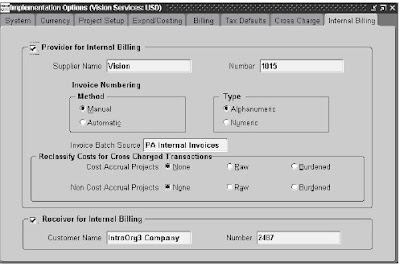
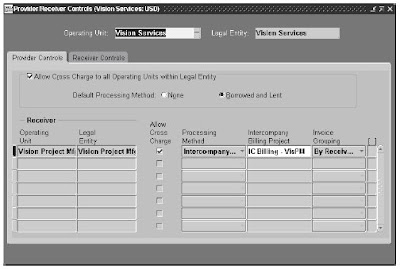
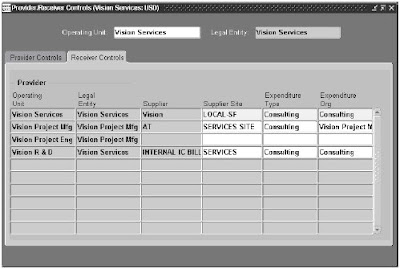
Setups to support Intercompany Billing: The setup steps are divided into the following phases: Global Setup: • Define transfer price rules • Define transfer price schedules • Define additional expenditure types, agreement types, billing cycles, invoice formats, and supplier types • Define an internal supplier • Define an internal customer Operating Unit Setup: • Define supplier sites for the internal supplier (receiver) • Define bill to and ship to sites for the internal customer (provider) • Define internal billing implementation options (each operating unit)
• Define internal tax codes for Receivables invoices (provider) • Define internal tax codes for Payables invoices (receiver) • Define an agreement for intercompany billing projects • Dene a Project Type for Intercompany Billing Projects • Dene Project Templates for Intercompany Billing Projects • Dene Intercompany Billing Projects (receiver) • Dene Provider and Receiver Controls
Provide Controls:
Receiver Controls:
• Dene AutoAccounting for Intercompany Billing Transactions
Steps to process Intercompany Transactions for Contract Projects (Canada = Provider OU, US = Receiver OU):
1. Receiver OU - Create/ Approve Contract. Enter "Employee Bill Rate and Discount Overrides" at the Project/ Task Level for Provider Employee’s 2. Provider OU - Employee enters time against Receiver OU Project 3. Provide OU - Time Card is approved 4. Provider OU - Employee enters & submits expenses against Receiver OU Project 5. Provider OU - Expense is approved are processed in AP 6. Provider OU - Run Transaction Import (Timecards), Interface Expense Reports to PA, Distribute Labor Costs 7. Receiver OU - Generate Draft Revenue 8. Provider OU - Review Proj Func Burdened, Labor, Expense Report Cost/ Accounts 9. Receiver OU - Verify Labor Revenue A/C, Expense Revenue A/C 10. Receiver OU - Run Project WIP Report (on demand), Project Manager reviews WIP Report and Attests Revenue 11. Receiver OU - Generate Draft Invoice, Approve & Release Draft Invoice 12. Receiver OU - Interface to AR, Review BPA Invoice, Run BPA Master Print Program to print invoice, Mail Invoice to Customer 13. Provide OU – Generate, Approve and Release Intercompany Invoice 14. Provide OU – Interface Intercompany Invoice to Receivables 15. Provide OU - Verify Intercompany Receivables / Revenue Account, Invoice Tax Account 16. Receiver OU – Run Payables Intercompany Invoices Interface Import, AP Post , Payables Transfer to GL, Validate Accounts