Hello World !
I am back to blogging and this time I will be posting a lot more about my real world experiences as a solution architect implementing various Oracle Fusion ERP and Cx cloud solutions ! Stay tuned and keep supporting me as you did before :)
Saturday, July 18, 2020
I am back baby.....did you miss me?


Thursday, August 29, 2013
Oracle Project Resource Management
Oracle Project Resource Management enables enterprises to:
- Leverage Single Global Resource Pool
- Deploy Resources Collaboratively
- Monitor Resource Utilization
- Streamline Organization Forecasting
- Analyze Resource Demand and Supply

Major Features:
- Oracle Project Resource Management enables companies to manage human resource deployment and capacity for project work.
- Built using Oracle’s proven self-service model, Oracle Project Resource Management empowers key project stakeholders, such as project managers, resource managers, and staffing managers, to make optimal use of their single most critical asset: their people.
- With this application, you can manage project resource needs, profitability and organization utilization by searching for, and locating and deploying most qualified people to your projects across your enterprise.
- As a result, you can improve customer and employee satisfaction, maximize resource utilization and profitability, and increase your competitive advantage.
- Oracle Project Resource Management is part of the E-Business Suite, an integrated set of applications engineered to work together.
Key Considerations while implementing Project Resource Management:
- PJR should be used in very process centric organizations. Value out of the application is made out only when processes are followed and data is properly maintained. Resource search of candidates relies on 3 parameters- Resource availability, Skills Set and Job levels.
- Segregation of resources eligible for Staffing - Project Resource Management maintains central resource pool that maintains data about resources availability, skill set, resume, address, job, email, work information, location etc. All the resources in an HR organization need not to be defined in resource pool. This refines the resource search and improve performance of the application.
- Integration between Project Resource Management and Project Management - Out of box functionality in Projects module allows integration between Project resource management and Project Management. Integration can be achieved either by Bottom-up approach as well as Top-down approach.
- Integration between Oracle Time and Labor and Project Resource Management - Objectives of the Project resource Management and Oracle time and labor totally different as one captures resource planning and other calculates actual. There is no out of box functionality available which integrates these two modules.
- Non project centric and small organization - Project Resource Management is not that beneficial for small organizations where there are few projects, non skills based organizations, not much movement of resources across projects or where there are few resources. It is generally used for mid-sized and large-sized organizations.
Tuesday, August 27, 2013
Creating Parties, Customer Accounts and Sites and creating party relationships
Creating Parties, Customer Accounts and Sites and creating party relationships:
The customer data is an important master data for all enterprises. The Oracle Trading Community Architecture (TCA) creates a central repository for the entire E-Business Suite to store information relating to all members of a trading community (including customers) versus separate tables for each member. The TCA model helps enterprises to record complex business relationships between Trading Community entities (including 3rd party relationships) and it supports all business models, industries, and geographies.
Yum Brands is the parent company for Pizza Hut and Taco Bell. This post explains how your company can think of modeling these three companies in your customer master based on industry best practices.
If your company has ‘Business Relationship’ with all three companies, they will need to be individually created as separate parties.
If your company has ‘Selling Relationship’ with all three companies, they will also need to be individually created as separate accounts.
The below screen shots explains how the three companies can be defined as three separate parties with individual customer accounts and sites. All of the invoices for all the three companies will be sent to Yum Brands headquarters in Delray Beach, FL. But the services are performed at 3 separate locations which are modeled below:


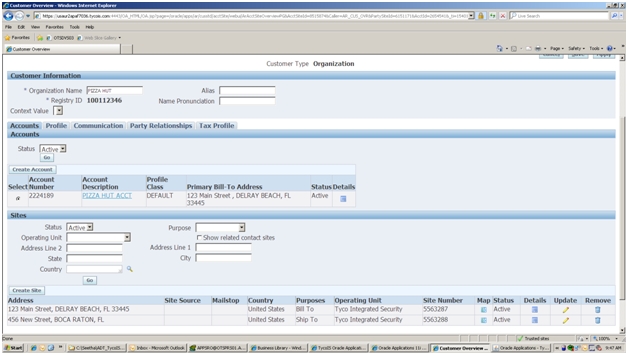
Once the parties, customer accounts and sites are created, we are now ready to assign relationships to the three parties. For this we navigate to ‘Relationship Manager’ and setup YUM BRANDS as a Parent of PIZZA HUT and TACO BELL as below:


Sunday, August 25, 2013
Deep dive into Oracle Project Management (PJT) Features and Functionalities
Oracle Project Management (PJT) Key Features:
- Workplan and Progress Management
- Reciprocal integration with MS Projects
- Oracle Resource Management Integration
- Enhanced Budgeting and Forecasting features
- Projects Deliverables Management
- Project Status Reporting
- Issue and Change Management
- Document Management
- Project Performance Reporting
- Performance Exceptions Reporting
- Performance Measures and Graphs
- Program Management and Reporting
- Facilitate scheduled completion of project work
- Task managers and team members can manage their tasks and communicate progress to the PM
- Supports the following key activities:
• Create and maintain tasks and resource assignments
• Track progress for projects, tasks, and resource assignments
- Use MS Projects to create and maintain WBS
- Send and receive a project
- Send an update
- View real-time project information
- Receive real-time values for task attributes
- Define Project resource requirements based on Project Roles
- Leverage competency for suitable searches with correct skill sets
- Determine project requirement staffing through search and nomination
- Automate employee assignment to the project
- Track time and report against the approved assignment
- Use pre defined (Discoverer) reporting workbooks for reporting
Enhanced Budgeting and Forecasting Features:
- Create budgets and forecasts to manage the financial performance
- Track project status and performance
- Generate budgets and forecasts from:
• Workplans,
• Financial plans
- Enter plan amounts using Microsoft Excel and HTML
- Create project deliverables, associate them with workplan tasks, and track them
- Define Deliverables
- Define Deliverables Actions
- Execute Deliverables Actions
- Collect & Rollup Deliverables Progress
- Integrate with Other Applications (e.g. AR for Billing)
- Report relevant project status information
- Control access to unpublished reports
- Reporting cycles define the start and end dates for the reporting period
- Centralized system to manage issues and change requests
- Team members can work together collaboratively
- Track issues and change requests from creation through to completion
- Create issues based on predefined issue types
- Assign actions to people to help resolve the issues
- Enable team members to comment on issues
- Export a list of issues into a Microsoft Excel spreadsheet for further analysis
- Automatically route issue approval using Oracle Workflow
- Team Members can attach and store documents
- Attachments can be:
• a URL
• a Plain text box
- Users can define attachment categories that defines the types of documents that can be attached
- Attachment categories can be based on common characteristics that a class of documents have
- “At-a-glance” comparison of actual versus planned performance as defined in project budgets and forecasts
- View performance in the areas of effort, cost, profitability, earned value, billing and collections, or capital costs
- Graphical and tabular overview of data
- Review of project performance information at the project, task, and resource levels by time period
- Drill down features to view detailed transaction information such as commitments, expenses, and events
- Review a summary of exceptions and issues on a project
- The status indicators provide an immediate understanding of critical, at risk, and on track issues on the project
- Drill down to the details of a single exception, and enter or review remarks and reminders for corrective actions
- Automatically generate the latest exceptions and key performance area status indicators on a periodic basis
- Automatically communicate the latest key performance area performance statuses and exceptions to key stakeholders via e-mail
- Supports predefined measures for cost and profitability
- Measures appear in the performance overview of the project
- Measures can be used to create custom measures
- Supports a set of predefined graphs that analyze cost, profit, and earned value information
- Program is a collection of projects linked in a hierarchical fashion
- View and manage workplan and financial information for a group of projects
- Track and report on rolled-up planned, actual, and forecasted effort, cost, and revenue, as well as progress and schedule information for all projects in the program hierarchy
- Top down linking approach facilitates navigation and drill down into the individual linked projects within the program hierarchy

Saturday, August 24, 2013
Evaluating Customer MDM Options
Many enterprises are faced with the challenge to implement a robust customer MDM solution. One of my clients had a very similar challenge and in this post I have explained in detail the approach we took to evaluate two different customer MDM options and the recommendation we made at the end of the evaluation.
The client in question had Siebel CRM as the front end Prospect and Customer Account creation system. The client had implemented Oracle R12.1.3 Ebusiness suite for their Order to Cash solution.
Customer MDM Option 1:
- Siebel will be the single point of entry for Customers and Address records
- Siebel will integrate with Trillium and D&B
- Oracle EBS will be the source of truth for Customer Records (GOLDEN RECORD)
- Other Enterprise Systems will subscribe to EBS for Customer Data

Customer MDM Option 2:
- Oracle EBS will integrate with Trillium and D&B
- Oracle EBS will be the source of truth for Customer Records (GOLDEN RECORD)
- Other Systems will subscribe to Oracle EBS for Customer Data
- In future Source systems can be added/removed without a significant change to the process

Comparision between Option 1 and Option 2:

Recommending Option 1 for the client:
- Recommended approach
- EBS is the master and system of record for Party and Customer Accounts
- Siebel would be the system of record to initiate it with data cleansing and validation
- Leverage client's current knowledge base and use of Trillium, D&B, SDR
- Use Trillium Realtime connector for data cleansing and enrichment
- Define D&B call details for enrichment
- Data Stewarts would exist both within Siebel Apps and EBS for addressing data relating to:
- Customer and Party attributes, including relationships
- EBS specific attributes for customer accounts etc (for example ACH, Credit card No, etc)
Project to Cash Enterprise - need for Order Management
One of my clients was implementing Oracle Ebusiness Suite 12.1.3 and was in construction business. The proposed foot print was to implement the Project to Cash suite of applications. But they were confused whether to implement Oracle Order Management or not.
For Project to Cash enterprises the key design decisions which need to be considered are presented below:
EBS Order Management key features and benefits for Project to Cash enterprises:
- Order references one or more lines, and each line is for a specific Inventory Item. Ship To can be defined at the line level
- Each order line is associated with Pricing through Price List
- Out of the box integration with AR for billing and revenue
- Integrates with Revenue Management functions in AR for deferred revenue and earned revenue accounting based on revenue contingencies and events (for example revenue to be earned only when customer pays in full)
- Native integration with Inventory for shipping and Cost of Goods Sold
- Full integration with Bill of Material and Configurator whereby by selecting a Model (product group for example), system will configure its components and explode each item into the Order Line
- Integration with WIP Manufacturing application to create Work Order for the SO Line and capture Material & Labor costs to the Work Order (based on Bill of Material)
- Native integration with Project Manufacturing for cost collection from Manufacturing (Labor and Material) into Project costing
- Integration with Service Contracts, Installed Base for selling services
- Connects with Credit Management for credit profiling, credit limits, etc
EBS Order Management key constraints for Project to Cash enterprises:
- Doesn’t have the capability to do milestone/progressive billing
- Application assumes that the billing has to be for the full amount of the line value upon shipment. Hence cannot model install job billing requirements.
- Significant work done so far for developing POC revenue cannot be ported to revenue management model and need to be developed from scratch
- Cannot leverage POC revenue work done so far for building completed contracts based revenue in revenue management model
- Forces the use of Bill of Material (BOM) and Work in Process (WIP) applications for being able to associate Labor and Material costs to the Work Order and booking the Cost of Goods Sold upon shipment. Overkill and complex for Project to Cash Enterprise business needs
- Doesn’t integrate with Project Costing and billing
- Projects integration requires implementing Project Manufacturing. Project Manufacturing needs to be turned on and configured for associating the project and task with OM Line for Manufacturing cost collection.
Credit Card Payment Processing in AR
Many clients will have the requirement to process customer credit card payments in a seamless fashion within Oracle AR. The Oracle Payments (previously iPayments in Rel 11) module enables this functionality working with Oracle AR using a 3 step process:
- Create Invoices: Create invoices in AR with payment method= ‘credit card’
- Credit Card Authorization: Create and approve receipt which includes getting approval codes through Oracle payments and Payment gateway/Payment Processor. Tyco is currently using Chase Paymenttech as a payment processor which Oracle has certified for R12 (Metalink Doc. ID: 471385.1) so we may want to use the same in the future.
- Credit Card Fund Capture: Generating remittances and capture fund through Oracle payments and Payment gateway/Payment Processor.


What is PSON?
- PSON stands for Payment Server Order Number and this is used by Payments during the funds capture settlement process. This field is located at receipt workbench and is populated by Oracle Payments after authorizing fund.
- Process for ACH processing:
- Oracle Payment, through Funds capture, supports ACH payment and can be integrated with any Payment system for Electronic fund transfer. For Tyco, Payment system can be their remittance banks.
- Process for ACH processing is same as credit card processing (Create Invoices, Authorization and Fund Capture/ Settlement) with following differences:
- Authorization step is optional for ACH
- ACH does not block funds during authorization
- Bank information is validated only once and then it is stored as a profile in Oracle payments whereas credit card payment needs approval (PSON) for every transaction.


CAS compliance for Federal Business
Cost Accounting Standards (CAS):
Cost Accounting Standards (popularly known as CAS) are a set of 19 standards and rules promulgated by the United States Government for use in determining costs on negotiated procurements. CAS differs from the Federal Acquisition Regulation (FAR) in that FAR applies to substantially all contractors, whereas CAS applies primarily to the larger ones.
When CAS will be applicable to your enterprise:
- Your enterprise performs work for federal government customers
- Your enterprise may be subject to 'full' CAS coverage (required to follow all 19 standards) when you receive either one CAS-covered contract of US$50 million or more, or a number of smaller CAS-covered contracts totaling US$50 million
- Your enterprise may be subject to 'modified' CAS coverage (required to follow only Standards 401, 402, 405, and 406) when you receive a single CAS-covered contract of US$7.5 million or more
- Your enterprise may be exempt from CAS standards provided:
- Contracts awarded to small businesses are exempt from CAS, regardless of contract size
- Any contract less than US$7.5 million is exempt, provided the company has not been awarded a contract greater than US$7.5 million, and also any contract less than US$700,000 is always exempt
- Contracts for commercial items
- Contracts awarded under sealed bid procedures, or where "adequate price competition" was available (the latter meaning where at least two companies had the ability to bid and perform on a contract, even if only one bid was later received)
- Contracts where the price is set by law or regulation
- Contracts awarded to foreign governments
- Contracts awarded to foreign concerns (only the disclosure statement and CAS 401 and 402 apply in this case)
In general these cost accounting standards and compliance is synchronous with US GAAP for accrual accounting.

Oracle Projects Suite of applications
What is Oracle Projects Suite of Applications?
- Project Foundation (PJF) - Common setups for Projects Suite like templates, project types, expenditure categories, expenditure types etc
- Project Costing (PJC) - Costing related functions for projects
- Project Billing (PJB) - Billing (both Revenue and Invoicing). Billing module license includes access to Costing module features
- Project Resource Management (PJR) - Labor resource management features. Project team role requirements are staffed through this application
- Project Collaboration (PJL) - Project team member collaboration
- Project Management (PJT) - Functionalities relating to workplan management, enhanced budgeting and forecasting, change control & project performance reporting. Seamless integration with all of the above modules.

Friday, August 23, 2013
BIG DECISION - do you want to turn on Item Serialization?
One of my clients whose primary footprint on the supply chain is Oracle EBS was at the crossroads of making a big decision - whether to turn on item serialization or not. This decision has lots of benefits but also comes with a lot of additional responsibilities to enter and track serial numbers. Here is the journey on how we evaluated the item serialization big decision for the client:
What is Serialization?
Oracle Inventory provides complete serial number support for inventory transactions. You can enable serial number control for specific items in your inventory. For items under serial number control, you assign unique serial numbers to individual units and
thereafter reference the same serial numbers each time you perform material transactions. This allows you to have tight control over every unit of every item in your inventory.

Serialization in Inventory & Installed Base tracking design:

Key considerations for the Client:
- Client does not create its own Serial No upon installing the Products and hence Serialization is applicable only to the Inventory ordered for the Project
- Serialization can be selectively turned on at specific item (A Type?) level
Key questions and design considerations presented to Client leadership team:
- Can we use serialization features at selective A type items such as Cameras?
- Can this be enabled using Item category/Catalogue definitions
- Can we model the Product sold (eg product1 product2 etc) as MTL Items (non tangible, but Item Master record with IB tracking enabled)?
- Can we define/track Client Serial No at that level?
- Is that scalable to future design of serialization turned on at lower levels?
- How does this get IB tracking benefits and for maintenance/upselling?
Based on the above framework and many deep dive sessions later, the client decided to turn on serialization only to key 'A' level high value items to begin with. This enabled them to adapt slowly to best industry practices and also have a scalable design to turn on serialization for 'B' and 'C' level items in the future.
Is Oracle Project Contracts a fit for your organization?
To understand if Project Contracts is the right fit for your organization, let us understand in detail its integration to other Oracle EBS modules:

Oracle EBS Integration:
- Provides several mechanisms to ensure timely delivery and receipt of products, services, and other contractual obligations.
- The Deliverable Tracking System (DTS) is the center of Contract Execution and is used to track all activities related to a contract.
- Deliverables can be inbound and outbound oriented, and can be internal or external.
- Examples of deliverables that can be tracked include planned receipt and shipment of items, mailing of an initial engineering drawing, or monthly submission of progress reports.
- The Deliverable Tracking System is integrated with other major components of the Oracle e-Business Suite, including Oracle Projects, Oracle Project Manufacturing, Advanced Planning and Scheduling, Oracle Internet Procurement, and Oracle Shipping Execution.
- This integration allows you to collect cost against a contract through projects and tasks, feed contractual demand into the planning system, create procurement documents such as purchase requisitions and purchase orders for direct-procured contract material and other items that are not sourced through planning, create shipment requests for shippable deliverables and track shipping and delivery statuses, generate billing events, and recognize revenue.
- All the manufacturing transactions take place at the project or project-task level depending on how the organization parameters are set, and if the project/project-task information is on the deliverable.
- Contract related information from the other products can also be viewed and tracked within the DTS with additional drill down capability.
Fitment and Suitability of Oracle Project Contracts for your organization:
- Project Contracts was designed and built primarily for Aerospace and Defence Industry. Enhancing its features or Web enabling it is on the current roadmap of Oracle Development
- Its powerful features is Contract creation, authoring and maintenance and handling Deliverables associated to the contract Lines (DTS)
- Funding association is at the Contract Line level and hence one contract can fund multiple related projects
- Billing integration is manual and the Application doesn’t call the Billing extension (for both Revenue and Billing)
- Sub Project associations can be modeled through the creation of a Master Project to represent the Contract and the associated projects created as Sub Projects
- Procurement integration is seamless based on Deliverables
- As an organization, you have to determine if you have any other similar modules / systems which provides project contract capabilities
- If not, then because of its powerful features and functionalities and its seamless integration with other EBS modules, you might want to consider implementing Oracle Project Contracts
Understanding Project Contracts (OKE)- features and functionalities
Project Contract structure and relationship:
- OKE Contract structure is similar to that of a Purchase Order.
- A PO could reference multiple Lines. Each PO line could reference multiple shipments. Each shipment could reference multiple distributions, which is the lowest level at which transactions are processed
- Similarly, OKE Contract (Header) contains core information of the Contract and references multiple Contract lines.
- Seeded values for Line style (Data Item, Free Format, Item, Option) are available for the defaulting of appropriate fields for data entry into the Contract Line
- Each Line could be associated with one or more deliverables classified as, inbound (receipt of goods and services) or outbound (shipment or providing of services)
- Contract is associated with a project and the contract line with one or more projects (please see below)
Master and Sub Project association:
- At the Contract Header, we associate the entire contract with a Project. This association is core to the integration with Projects Suite
- Typically, we might have several parallel projects that are being planned and executed for one Master Contract/Agreement. They might reference multiple lines and multiple deliverables, each of which might be a finished item, manufactured and shipped from an inventory organization
- To ensure they are all appropriately linked to the contract line, we need to define the Sub Project Association (at its task level) for the Project selected for the Contract Header
- Sub Project Association does not roll up costs, revenue, etc and is meant primarily to select it at the Contract line level. To achieve the benefit of Performance roll up, if the client is licensing PJT too, the Master project associated at the contract header should be defined as a Program project and the child projects associated with its task, in addition to also associating them as sub project
- Through this design, a Master (Program) project associated at the Header can be used to associate the multiple delivery projects (defined as sub project to its task) at the individual contract line
- The unique feature of OKE Funding is that a Contract could be funded by multiple parties and can fund multiple projects
- At the Contract level, in the Parties and Contacts Tab, we associate the multiple Fund by Parties, which drives the validation for funding association at the contract line level. Hence, a Contract could be entered into with multiple Fund by parties simultaneously
- The Application validates the Fund by Party assignment at the Contract when we select a party in the Funding Workbench in OKE to fund the applicable Project associated with a line
- OKE funding is initiated and handled only in OKE and upon the funding being definitized, the Application automatically creates the Funding Agreement record in Projects with the Product Source of OKE and populating the Reference field with a unique No that is concatenated with the Currency code of Funding
- We can enforce Hard limits for invoice, revenue, etc as per the normal Funding done in Projects. Maintenance of Funding is done only in OKE. We could also use the functionality of automatic baseline without revenue budget feature from OKE Funding
- This is the core of OKE functionality. Integration of OKE with other Applications is handled, controlled and monitored from this workbench.
- It displays the relevant information in various tabs the details of integration and provides particulars of records processed there.
- These are Requisition, Purchasing, Receiving, Payables, Shipping, Receivables, etc. For example, Receivables tab would show the Draft Invoice No, AR Transaction No, Amount unpaid, etc.
Project Manufacturing Integration (PJM):
- OKE integration with Manufacturing, for a project centric operation, is through PJM.
- Each of the project referenced in the contract line needs to be PJM enabled in the inventory org referenced in the Contract.
- This ensures that the standard Project Cost Collection Process transfers the summarized costs from Mfg at the cost element level (Material, labor, Outside Processing and Material and Mfg Overheads) to PJC.
Manufaturing Planning Integration (Project MRP):
- Manufacturing Planning integration is another key area of integration.
- We can initiate Deliverables Planning from DTS for the item.
- We need to select the Master Demand Schedule (MDS) Plan Name and the application creates a manual entry for the MDS.
- After that, we need to run MRP with the manual MDS source and the Application plans the execution using the Planning option, pegging levels, BOM, etc of the item.
- Project and Task references default into the various Work Orders and costs appropriately collected in PJC.
- We need to run a process to relieve the MDS demand to avoid duplication of demand creation (upon shipping execution, Planning Manager does not relieve the manual MDS demand created through this integration)
Procurement Integration:
- Expense, Inventory destination items and Non catalogue items can be initiated for Procurement from DTS directly.
- OKE workflow creates the process and we launch Requisition Import with the source as OKE to create the approved Requisition in Purchasing.
- It can be then auto created as PO and processed normally.
- Project information defaults into the Distribution based on the association of the DTS Deliverable with the Project and Task.
Shipping Execution Integration:
- We can also launch Shipping Execution and confirmation from DTS.
- This information is passed to Shipping Execution.
- This would be done when the outbound deliverable item that is planned for execution in Mfg is ready for Shipping
Project Billing Integration:
- When the outbound deliverable item is ready to be billed (item defined as Invoicable and Invoice enabled), we can launch the creation of billing events (for both revenue and invoice).
- In the window we enter the event type and initiate the event creation.
- This creates the eligible event that is then automatically processed when we generate revenue and invoice from Projects.
Why TCA Matters for Clients running Oracle Ebusiness Suite
Why TCA Matters - What clients get from the TCA architecture:
- Architecture to model your customers and other trading partners as you see best for your business
- Architecture that will grow with your requirements
- Features to maintain extremely reliable customer information (e.g. ABC Co. is now sure that their supplier John of XYZ Inc is the same person as their customer, John of XYZ Inc)
- Glue that ties several E-Business Suite flows in a seamless way
- Customer Data Integration solution even if you are not running a single E-Business Suite module
- Platform that can play a key role in your IT landscape for Master Data Management
Why TCA Matters - What clients have to do:
- Take a close look at how you do business and how your business processes are most efficiently performed
- Ask questions about how you should model customer information e.g. which entities should be modeled as parties; when should you create an account; should you create multiple accounts for some parties; should you create multiple billing sites for an account; should you create account relationships
- Even if you are implementing few modules of E-Business Suite to start with, keep in mind the bigger picture about customer information
Oracle TCA uptakes in Oracle Release 12
TCA update in R12 to additional entities:
- Banks & Bank Branches
- Suppliers
- Legal Entity

TCA in R12 - New Bank Account Model:
- Central place to define internal bank accounts
- Keep track of all bank accounts in one place
- Explicitly grant account access to multiple operating units/functions and users
- Multi-Org Access - In the new model, bank accounts are owned by Legal Entities with the option to grant account use to Operating Unit (Payables, Receivables), Legal Entity (Treasury), Business Group (Payroll)
- Reduce number of access points to manage bank accounts - Centralized user interface
- Improve visibility and control of bank accounts - Multi-org access control
- Simplify bank reconciliation - Single bank statement can be reconciled across multiple Operating Units
- Increase percentage of automatically reconciled transactions - Bank account level reconciliation parameters add flexibility
- Supplier organizations are in TCA
- Terms of doing business with the supplier are in Purchasing / Payables
- Supplier organization, address, contact, phone, email etc. are all in TCA
- Employees are already in TCA, Payables using the same employee records in TCA
- New supplier maintenance UI using TCA UI components
TCA in R12 - Benefits of Supplier representation:
- Single repository for suppliers data
- AR/AP netting
- Oracle Payments serves as a payment data repository on top of the Trading Community Architecture (TCA) data model. The TCA model holds the party information. Oracle Payments then stores all of the party’s payment information and its payment instruments (including credit cards, debit cards, customer bank accounts, and supplier bank accounts).
- Legal entity is created as a party of party type ORGANIZATION or PERSON
- An establishment is created as a party of party type ORGANIZATION
- TCA creates a new classification category called “Business Function”. It is used mainly to model what business functions a party can perform in E-Business Suite
- For modeling legal entities and establishments in TCA, classification code “Legal Entity” and “Establishment” are created under the “Business Function” class category
- An establishment is created as a party and always link to a party that is classified as a legal entity through the relationship model
- TCA creates the global view of person
- TCA enables you to store person Information at a corporate level
- Person is stored as party in TCA
- Comprehensive duplicate person check when entering a new person – Across the business group
- Propagate some information entered in one business group to the record in the other business group
- PER_ALL_PEOPLE_F.PARTY_ID is a foreign key to the HZ_PARTIES table, an integral part of Oracle's "Trading Community Architecture" (TCA).
Oracle Trading Community Architecture (TCA) - key concepts
TCA = Trading Community Architecture; Data Model and not Module. TCA provides a single, universal definition of trading partners across applications and job function.
A Trading Community Architecture is a way to understand who our trading partners interact with inside and outside the enterprise. TCA puts a foundation in place for a trading partner model:
- Linking Suppliers and Customers
- Online Marketplace
- Shared Service Centers
- First introduced in 11i
- Introduction of Oracle CRM application
- Requirement for a common customer model for all Oracle Applications
- Model evolved from working with ERP and CRM teams to create a view of the customer base which supports all flows throughout the E-Business Suite
- To support both B2B and B2C business models
- Re-architected to enable future support for entire trading Community
- Create a central repository for the entire E-Business Suite to store information relating to all members of a trading community versus separate tables for each member
- Prospects, Customers, Contacts, Employees, Partners, Distributors, Suppliers, Banks, etc.
- Record complex business relationships between Trading Community entities (including 3rd party relationships)
- Support all business models, industries, and geographies
TCA Data Model: Parties vs. Accounts:
- From an application perspective, one of the most important things to understand about the TCA model is that the concept of “customer” is separated into two layers: The Party layer and the Account layer.
- When CRM applications refer to “Customer” they are referring to the Party Layer.
- On the other hand, when ERP applications refer to “Customer” they are referring to the Account Layer.
- Thus, confusion arises because both are using the word “Customer” to refer to two different things.
- Public API’s for data manipulation of TCA tables
- Common Party User Interface Components
- Hierarchy Model
- Bulk Import of customer data and D&B Integration
- DQM for duplicate prevention
- Party and Account Merge
TCA data dictionary:
- HZ Parties - Stores basic information about parties and their relationship. Party ID is the primary key. Party id, Party Number, Party Name and Party Type are key columns. Establishes the Business Relationships.
- HZ Locations - Stores delivery or postal address. Location ID is the primary key. Not to be used for modeling party hierarchical relationships (use party relationships). Identifies the Party and its Account. Location can cross Parties and a Party can have multiple Locations. Account (beneath the Party) inherits the Locations defined for the Party.
- HZ Party Sites - Table that links HZ Parties with HZ Locations. Party Site ID is the primary key.
- HZ Cust Accounts - Different instances of Business Relationships (Selling, etc). Multiple Accounts can exist for a Party. Cust Account ID is the primary key.
- HZ Cust Acct Sites All - Site reference to the Account . Partitioned by Org Id. Primary Key is Cust Acct Site Id.
- HZ Cust Site Uses All - Stores business purpose usage (Bill To, Ship To, etc) for the Customer Account. Site Use Id is the Primary Key. Integrated with HZ Cust Acct Sites All.
- HZ Customer Profiles - Stores credit characteristics of Party, Account, Site.
- HZ Party Relationships - Stores relationships between parties.
- HZ Cust Profile Classes - Stores credit characteristics that is common across a group of Accounts

Friday, December 17, 2010
Order Management - Pick Release Concepts
Release Rules
- Release rules define the criteria to be used during Pick Release. Only orders that meet the criteria and are eligible will be released. An order line is eligible if it has completed the prerequisite workflow activities, such as Schedule - Line or Create Supply.
- Release Sequence rules determines the order in which inventory is allocated to sales orders. You choose to allocate by order, outstanding Invoice value, Scheduled Date, Departure Date and Shipment Priority.
- The order in which sales orders are filled could be very important. If a company has a problem of running out of material before all of their orders have been filled it is very important that they have filled their most important orders first.
- Picking rules, which are created and maintained in Oracle Inventory, suggest which material to use, based on inventory controls such as revision control, lot control, FIFO (first in first out) or subinventory/locator picking numbers.
- Picking rule is an Item Attribute. Create a variety of picking rules and associate them with the appropriate items. If there isnt a Picking Rule associated with the item, the system will use the organizations default picking rule which is found on the Shipping organizations Parameters.
- Note: Picking Rules are covered in Oracle Inventory. To learn more see Oracle Inventory users guide.
- Pick Slip Grouping Rules organize how released order lines are grouped on Pick Slips for ease of picking. For Example: By using the Pick Slip Grouping Rule as Subinventory, the user can reduce the number of trips to a particular subinventory by grouping all lines for that subinventory on to one Pick Slip.
Order Management - Shipping Concepts
Trip
- A trip is carrier specific and represent a unique instance of that carrier leaving your warehouse with deliveries.
- The carrier could be a public carrier such as DHL or could be a companys own fleet of trucks.
- A trip could represent a truck, air cargo, ship cargo, or railcar. These entities would be set up as items in Oracle Inventory with an item type of Vehicle.
- Each trip has a minimum of two stops, pick-up and drop-off.
- A trip can be created automatically or manually from the Shipping Transactions form or can be automatically created from the Ship Confirm window. You can also create a trip as a part of a concurrent process.
- Companies that use public carriers can enable the system to automatically create Trips as part of of the Ship Confirm process. This eliminates unnecessary transactions.
- A stop is a point along the route of a trip that is due for pick-up or drop-off.
- The Ship Confirm process can initiate closing the pick-up stop updating the delivery
status to Intransit. - Manually record all stops made by the Trip using the Shipping Transactions form or
have the Ship Confirm process automatically close a Trip, which creates and closes the
pick-up stop and drop-off stop and changes the Delivery status to Closed. - Companies that use public carries let the system automatically close a Trip as part of Ship
Confirm.
- A delivery leg consists of two stops where the delivery is picked up and dropped off, respectively on the same trip. The delivery might travel through several legs to get to its final destination and is synonymous to the Bill of Lading.
- A bill of lading is a receipt, listing all the goods that were signed over to a carrier.
- The Ship Confirm window enables you to generate a bill of lading which can then be printed separately or as part of the Delivery Document Set.
- A delivery must be created to perform Ship Confirm. It represent all the goods that were shipped from the same warehouse, going to the same Customer location.
- The grouping of delivery lines into deliveries is restricted by the grouping rules that are established on the Shipping Parameters - Delivery Tab.
- A delivery can be created automatically or manually from the Shipping Transactions form at any time after the order line status has become Awaiting Shipment or can be automatically created during the Release Sales Order process.
- A delivery is also automatically created when you invoke the action Pick and Ship or Pick, Pack, and Ship.
- Delivery lines are sales order lines which have completed all their workflow activities that are prerequisites to Oracle Shipping Execution such as Schedule Line or Create Supply.
- Delivery lines are visible from the Shipping Transactions form. They are also visible from the sales order lines Additional Information Deliveries tab.
- Delivery lines with similar attributes can be systematically grouped together into deliveries based on grouping rules.
- LPN, (License Plate Number) are also known as Containers. An LPN can be loaded inside of another container, for example, pack an item into a box and then pack that box onto a pallet.
- Optionally LPNs can be setup as inventory items if the shipper is interested in using weight and Volume and packing functionality.
- LPNs can be made mandatory using your Shipping Parameters.
- The ship-from location represents the warehouse that is performing the shipping transaction. A warehouse is an Inventory organization.
Ship to
- The Ship To Location represents a Ship-To address that has been setup on the customers record.
Order Management Concepts - Shipping Execution Flow
After a sales order has been booked, the sales order lines must complete all workflow activities leading up to the shipping activity. Two typical preceding workflow activities are Schedule - Line and Create Supply.
Schedule – Line:
Scheduling the line makes the order lines demand visible to Oracle Inventory for planning. It
also sets the Shipment Schedule Date.
Create Supply:
Variety of subflow paths can be taken within Create Supply Line based on the type of item
shipped. They are as follows:
Configurable Items: Configurable items must complete the Create Supply activity
which takes an order line through a build cycle. The final assemblies that are completed
out of Oracle Work in Process are received into Oracle Inventory as Reserved for a
specific customers order.
Drop ship: Drop ship order lines must complete the Create Supply activity too. After a
Purchase Requisition has been passed to Oracle Purchasing the order line advances to the
Shipping Activity.
Standard Shippable Items: Standard shippable items don't need to perform any of the
Create Supply activities so directly advance to the Shipping activity.
Shipping:
What happens when the order line reaches ‘Ship Line’ workflow activity?
- Oracle Order Management calls Oracle Shipping Execution APIs to indicate that a line is Ready to Release.
- The sales order line status is changed to Awaiting Shipping. Order lines that are awaiting shipping are called Delivery Lines in the Oracle Shipping Execution module
- Pick Release process creates move orders to move items to the staging location and create
- reservation in Oracle Inventory
- From the staging area shipments are weighed, packed and shipped
- Deliveries are Ship Confirmed out of the staging location
- When a delivery is Ship Confirmed, Oracle Shipping Execution calls OM APIs to communicate the event, triggering the line flow to move forward
Thursday, November 11, 2010
Order Management Concepts - Qualifiers and Modifiers
Qualifiers:
A qualifier defines eligibility rules for modifiers and price lists.
A qualifier can be a customer name, a customer class, an order type, or an order amount that can span orders.
Though a qualifier may be set up independently, it comes into effect only when linked to a modifier or a price list. Thus, the modifier that is set up and linked to a qualifier determines who the price adjustment will affect as well as the amount that will change.
You can create qualifier groups to apply individual qualifiers as a set. When you group qualifiers, they become a set, which allows for faster searching and setup.
Modifiers:
Modifiers determine the adjustments made to the list price. These are dependant on various business factors such as the type of adjustments to make, the level at which the adjustments are made, how the modifiers are qualified, how they are applied, etc. You can create three modifier list types in Oracle Pricing:
• Discount List
• Surcharge List
• Freight and Special Charges List
There are four modifier line types available in Oracle Pricing:
• Discount
• Surcharge
• Freight and Special Charges: Amount applied to the customer invoice for movement of a shipment to a destination
• Price Break: Only point price breaks are allowed in Basic Pricing modifiers. For example, the following pricing decisions are:
If Item Quantity = 1-50, then discount = 5%
If Item Quantity = 51-100, then discount = 7%
If Item Quantity is between 101 and 99999999999, then discount = 10%.
So if the ordered item quantity is 110, then the discount applicable is 10%.
Modifier controls are of the following types:
Pricing Event is a time in the process flow of the calling application at which it makes a call to the pricing engine (analogous to an Oracle Workflow event); for example, Book Order in Order Management.
Pricing Phase is a user-defined group of modifiers that the search engine considers together when applying them to pricing requests, for example, Phase 1: Line Adjustments.
Incompatibility: In any given level within the same phase, the system only allows one modifier to be selected. The pricing engine may retrieve more than one modifier that meets the calling request and can be applied. There are three methods to resolve incompatibilities within the modifiers that the pricing engine retrieves:
• Precedence
• Best price
• Exclusivity
Incompatibility Level: Each modifier has an incompatibility level. If there is more than one modifier line with the same incompatibility level, the pricing engine selects the one with the highest precedence. If there is more than one modifier with the highest precedence in an incompatibility level, the pricing engine selects the modifier that provides the best benefit to the customer.
In Basic Pricing, users cannot add additional phases or events, and incompatibility level and buckets are defaulted.
Order Management Concepts - Basic Vs Advanced Pricing
Oracle offers two levels of pricing functionality: Basic and the separate enhanced product, Advanced Pricing. While both levels of functionality share some similarities, the licensed Advanced Pricing application extends the ability to adjust pricing.
Price Lists:
The creation of price lists within both levels carries many of the same elements. Both are able to add items to, and copy price lists. However, as you implement Advanced Pricing, the ability to use Qualifiers, Pricing Attributes, and Secondary Price Lists becomes extended from only allowing the default or one context element in Basic, to an unlimited number of values being available.
Agreements:
The use of Agreements is the same for both Basic and Advanced Pricing. They are both able to identify customer items, create price lists, use versioning, and define price breaks.
Formulas:
Both Basic and Advanced Pricing allow Static Formulas, while only Advanced Pricing allows the use of Dynamic Formulas.
Modifiers:
While both basic and Advanced Pricing have the ability to execute Discounts, Surcharges, Freight Charges, and point-based price breaks, Advanced Pricing extends this functionality greatly. Advanced Pricing also allows price modifications via Coupons, Terms Substitution, Promotions, Item Upgrades, and Other Items discounts. Additionally, Advanced Pricing
allows you to implement adjustment functionality that will change the list price used for the adjustment; affect the timing of when the adjusting activity will occur; and enable you to define rules affecting which adjustments may be used at the same time. In Advanced Pricing,
you can also flag discounts as exclusive, which implies that only that discount will be eligible and no others.
Note: Additionally, Advanced Pricing enables you to derive prices from external sources. For further information on the Advanced Pricing functionality, please refer to the Advanced Pricing User and Implementation Manuals.
Subscribe to:
Posts (Atom)


